
Camera Support
Understanding How Dragonframe Uses Your Camera
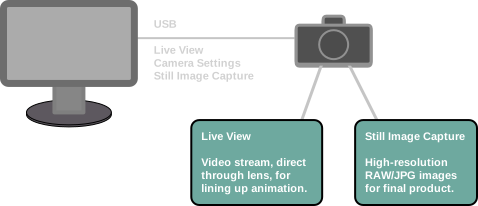
When shooting animation, Dragonframe will create two separate image sequences in tandem:
- The first is a series low-resolution frames derived from a live video source for use in refining animation. We call this the video assist.
- The second is from a high-quality capture source, such as RAW files from a DSLR, for final frames.
These image sequences are kept in perfect tandem during shooting and editing within Dragonframe.
This process takes particular advantage of DSLR Live View capabilities. Dragonframe can use the DSLR’s live view to provide a video assist for animation, then capture a full-resolution still image every time you shoot a frame.
Choosing the Right Camera
To have the best experience animating, you need to have the right camera. Choose a camera that Dragonframe supports, and that has live view and camera control over USB. We recommend Canon EOS models, and the majority of professional work is done with them. The mirrorless Canon EOS R and Nikon Z series are both great options for stop motion animation. Supported models from Sony and Olympus are also very good options.
Canon EOS R / RP / R5 / R8 / R100 / R6 Mark II – Stop Motion Animation Firmware
For high quality, professional stop motion work, we recommend the Canon EOS R, RP, R5, R8, R100 or R6 Mark II with stop motion animation firmware (a separate purchase, availability may vary by region). (More Info)These models have a massive 1920 x 1280 live view over USB, as well as new focus peaking capabilities. Note that aperture lock and focus control require Dragonframe 5 or newer.
Setup and Troubleshooting
Find your camera in the list below. Follow the Setup link to find setup instructions specific to your camera.
If your camera is on our supported list (below):
- Follow the setup instructions for it, thoroughly.
- Make sure your version of the software supports the camera.
- Make sure your software is up to date. Use the program’s Preferences : Updates to check.
- Review our Camera FAQs for answers to common camera issues. [Camera FAQs]
- Contact support if you still need help.
If your camera is not on the list, then it does not work with Dragonframe. There may be options to get some type of capturing, but the experience won’t be very good. We strongly recommend finding a camera on the list if you are serious about stop motion animation.
See the Camera FAQs for more information about unsupported cameras.
Supported Cameras
| Maker | Model | Live View | DF Version | Setup |
|---|---|---|---|---|
| Canon | EOS C50 | 960 x 640 | 2026.07.1 or newer | Setup |
| Canon | EOS R1 | 960 x 640 | 2025.01.2 or newer | Setup |
| Canon | EOS R | 960 x 640 | 4.3.4 or newer | Setup |
| Canon | EOS R (Stop Motion Firmware) | 1920 x 1280 | 4.3.4 or newer | Setup |
| Canon | EOS RP | 960 x 640 | 4.3.4 or newer | Setup |
| Canon | EOS RP (Stop Motion Firmware) | 1920 x 1280 | 4.3.4 or newer | Setup |
| Canon | EOS R3 | 960 x 640 | 5.1.5 or newer | Setup |
| Canon | EOS R5 | 960 x 640 | 4.3.4 or newer | Setup |
| Canon | EOS R5 (Stop Motion Firmware) | 1920 x 1280 | 4.3.4 or newer | Setup |
| Canon | EOS R5 Mark II | 960 x 640 | 2024.09.1 or newer | Setup |
| Canon | EOS R5 C | 960 x 640 | 5.1.5 or newer | Setup |
| Canon | EOS R6 | 960 x 640 | 4.3.4 or newer | Setup |
| Canon | EOS R6 Mark II | 960 x 640 | 5.1.5 or newer | Setup |
| Canon | EOS R6 Mark II (Stop Motion Firmware) | 1920 x 1280 | 5.1.5 or newer | Setup |
| Canon | EOS R6 Mark III | 960 x 640 | 2026.01.1 or newer | Setup |
| Canon | EOS R6 Mark III (Stop Motion Firmware) | 1920 x 1280 | 2026.01.1 or newer | Setup |
| Canon | EOS R6 Mark V | 960 x 640 | 2026.07.1 or newer | Setup |
| Canon | EOS R7 | 960 x 640 | 5.1.5 or newer | Setup |
| Canon | EOS R8 | 960 x 640 | 5.1.5 or newer | Setup |
| Canon | EOS R8 (Stop Motion Firmware) | 1920 x 1280 | 5.1.5 or newer | Setup |
| Canon | EOS R10 | 960 x 640 | 5.1.5 or newer | Setup |
| Canon | EOS R50 | 960 x 640 | 5.1.5 or newer | Setup |
| Canon | EOS R50 V | 960 x 640 | 2026.01.1 or newer | Setup |
| Canon | EOS R100 | 960 x 640 | 5.1.5 or newer | Setup |
| Canon | EOS R100 (Stop Motion Firmware) | 1920 x 1280 | 5.1.5 or newer | Setup |
| Canon | EOS 1D Mark III | 1024 x 680 | 2.3.8 or newer | Setup |
| Canon | EOS 1Ds Mark III | 1024 x 680 | 2.3.8 or newer | Setup |
| Canon | EOS 1D Mark IV | 1056 x 704 | 2.3.8 or newer | Setup |
| Canon | EOS 1D X | 960 x 640 | 3.7.4 or newer | Setup |
| Canon | EOS 1D X Mark II | 960 x 640 | 4.3.4 or newer | Setup |
| Canon | EOS 1D X Mark III | 960 x 640 | 4.3.4 or newer | Setup |
| Canon | EOS 1D C | 960 x 640 | 4.3.4 or newer | Setup |
| Canon | EOS 5D Mark II | 1024 x 680 | 2.3.8 or newer | Setup |
| Canon | EOS 5D Mark III | 960 x 640 | 3.7.4 or newer | Setup |
| Canon | EOS 5D Mark IV | 960 x 640 | 4.3.4 or newer | Setup |
| Canon | EOS 5Ds | 960 x 640 | 3.7.4 or newer | Setup |
| Canon | EOS 5Ds R | 960 x 640 | 3.7.4 or newer | Setup |
| Canon | EOS 6D | 960 x 640 | 3.7.4 or newer | Setup |
| Canon | EOS 6D Mark II | 960 x 640 | 4.3.4 or newer | Setup |
| Canon | EOS 7D | 1056 x 704 | 2.3.8 or newer | Setup |
| Canon | EOS 7D Mark II | 960 x 640 | 3.7.4 or newer | Setup |
| Canon | EOS 40D | 1024 x 680 | 2.3.8 or newer | Setup |
| Canon | EOS 50D | 1024 x 680 | 2.3.8 or newer | Setup |
| Canon | EOS 60D | 1056 x 704 | 2.3.8 or newer | Setup |
| Canon | EOS 60Da | 1056 x 704 | 3.7.4 or newer | Setup |
| Canon | EOS 70D | 960 x 640 | 3.7.4 or newer | Setup |
| Canon | EOS 77D | 960 x 640 | 4.3.4 or newer | Setup |
| Canon | EOS 80D | 960 x 640 | 4.3.4 or newer | Setup |
| Canon | EOS 90D | 960 x 640 | 4.3.4 or newer | Setup |
| Canon | EOS 100D | 960 x 640 | 3.7.4 or newer | Setup |
| Canon | EOS Rebel SL1 | 960 x 640 | 3.7.4 or newer | Setup |
| Canon | EOS Kiss X7 | 960 x 640 | 3.7.4 or newer | Setup |
| Canon | EOS 200D | 960 x 640 | 4.3.4 or newer | Setup |
| Canon | EOS Rebel SL2 | 960 x 640 | 4.3.4 or newer | Setup |
| Canon | EOS Kiss X9 | 960 x 640 | 4.3.4 or newer | Setup |
| Canon | EOS 250D | 960 x 640 | 4.3.4 or newer | Setup |
| Canon | EOS Rebel SL3 | 960 x 640 | 4.3.4 or newer | Setup |
| Canon | EOS Kiss X10 | 960 x 640 | 4.3.4 or newer | Setup |
| Canon | EOS 200D Mark II | 960 x 640 | 4.3.4 or newer | Setup |
| Canon | EOS 450D | 858 x 560 | 2.3.8 or newer | Setup |
| Canon | EOS Rebel XSi | 858 x 560 | 2.3.8 or newer | Setup |
| Canon | EOS Kiss X2 | 858 x 560 | 2.3.8 or newer | Setup |
| Canon | EOS 500D | 928 x 616 | 2.3.8 or newer | Setup |
| Canon | EOS Rebel T1i | 928 x 616 | 2.3.8 or newer | Setup |
| Canon | EOS Kiss X3 | 928 x 616 | 2.3.8 or newer | Setup |
| Canon | EOS 550D | 1056 x 704 | 2.3.8 or newer | Setup |
| Canon | EOS Rebel T2i | 1056 x 704 | 2.3.8 or newer | Setup |
| Canon | EOS Kiss X4 | 1056 x 704 | 2.3.8 or newer | Setup |
| Canon | EOS 600D | 1056 x 704 | 2.3.8 or newer | Setup |
| Canon | EOS Rebel T3i | 1056 x 704 | 2.3.8 or newer | Setup |
| Canon | EOS Kiss X5 | 1056 x 704 | 2.3.8 or newer | Setup |
| Canon | EOS 650D | 960 x 640 | 3.7.4 or newer | Setup |
| Canon | EOS Rebel T4i | 960 x 640 | 3.7.4 or newer | Setup |
| Canon | EOS Kiss X6i | 960 x 640 | 3.7.4 or newer | Setup |
| Canon | EOS 700D | 960 x 640 | 3.7.4 or newer | Setup |
| Canon | EOS Rebel T5i | 960 x 640 | 3.7.4 or newer | Setup |
| Canon | EOS Kiss X7i | 960 x 640 | 3.7.4 or newer | Setup |
| Canon | EOS 750D | 960 x 640 | 3.7.4 or newer | Setup |
| Canon | EOS Rebel T6i | 960 x 640 | 3.7.4 or newer | Setup |
| Canon | EOS Kiss X8i | 960 x 640 | 3.7.4 or newer | Setup |
| Canon | EOS 760D | 960 x 640 | 3.7.4 or newer | Setup |
| Canon | EOS Rebel T6s | 960 x 640 | 3.7.4 or newer | Setup |
| Canon | EOS 8000D | 960 x 640 | 3.7.4 or newer | Setup |
| Canon | EOS 800D | 960 x 640 | 4.3.4 or newer | Setup |
| Canon | EOS Rebel T7i | 960 x 640 | 4.3.4 or newer | Setup |
| Canon | EOS Kiss X9i | 960 x 640 | 4.3.4 or newer | Setup |
| Canon | EOS 850D | 960 x 640 | 4.3.4 or newer | Setup |
| Canon | EOS Rebel T8i | 960 x 640 | 4.3.4 or newer | Setup |
| Canon | EOS Kiss X10i | 960 x 640 | 4.3.4 or newer | Setup |
| Canon | EOS 1000D | 768 x 512 | 2.3.8 or newer | Setup |
| Canon | EOS Rebel XS | 768 x 512 | 2.3.8 or newer | Setup |
| Canon | EOS Kiss F | 768 x 512 | 2.3.8 or newer | Setup |
| Canon | EOS 1100D | 1056 x 704 | 2.3.8 or newer | Setup |
| Canon | EOS Rebel T3 | 1056 x 704 | 2.3.8 or newer | Setup |
| Canon | EOS Kiss X50 | 1056 x 704 | 2.3.8 or newer | Setup |
| Canon | EOS 1200D | 1056 x 704 | 3.7.4 or newer | Setup |
| Canon | EOS Rebel T5 | 1056 x 704 | 3.7.4 or newer | Setup |
| Canon | EOS Kiss X70 | 1056 x 704 | 3.7.4 or newer | Setup |
| Canon | EOS 1300D | 960 x 640 | 4.3.4 or newer | Setup |
| Canon | EOS Rebel T6 | 960 x 640 | 4.3.4 or newer | Setup |
| Canon | EOS Kiss X80 | 960 x 640 | 4.3.4 or newer | Setup |
| Canon | EOS 2000D | 1056 x 704 | 4.3.4 or newer | Setup |
| Canon | EOS 1500D | 1056 x 704 | 4.3.4 or newer | Setup |
| Canon | EOS Rebel T7 | 1056 x 704 | 4.3.4 or newer | Setup |
| Canon | EOS 4000D | 960 x 640 | 4.3.4 or newer | Setup |
| Canon | EOS 3000D | 960 x 640 | 4.3.4 or newer | Setup |
| Canon | EOS Rebel T100 | 960 x 640 | 4.3.4 or newer | Setup |
| Canon | EOS M6 Mark II | 960 x 640 | 4.3.4 or newer | Setup |
| Canon | EOS M50 | 960 x 640 | 4.3.4 or newer | Setup |
| Canon | EOS Kiss M | 960 x 640 | 4.3.4 or newer | Setup |
| Canon | EOS M50 Mark II | 960 x 640 | 4.3.4 or newer | Setup |
| Canon | EOS Kiss M2 | 960 x 640 | 4.3.4 or newer | Setup |
| Canon | EOS M200 | 960 x 640 | 4.3.4 or newer | Setup |
| Fujifilm | GFX 50S | 1024 x 768 | 4.3.4 or newer | Setup |
| Fujifilm | GFX 50R | 1024 x 768 | 4.3.4 or newer | Setup |
| Fujifilm | GFX 100 | 1024 x 768 | 4.3.4 or newer | Setup |
| Fujifilm | GFX 100 II | 1024 x 768 | 2025.05.3 or newer | Setup |
| Fujifilm | GFX 100S | 1024 x 768 | 4.3.4 or newer | Setup |
| Fujifilm | GFX 100S II | 1024 x 768 | 2025.05.3 or newer | Setup |
| Fujifilm | X-M5 | 1024 x 768 | 2025.05.1 or newer | Setup |
| Fujifilm | X-T1 | 640 x 480 | 4.3.4 or newer | Setup |
| Fujifilm | X-T2 | 1024 x 768 | 4.3.4 or newer | Setup |
| Fujifilm | X-T3 | 1024 x 768 | 4.3.4 or newer | Setup |
| Fujifilm | X-T4 | 1024 x 768 | 4.3.4 or newer | Setup |
| Fujifilm | X-T5 | 1024 x 768 | 5.1.5 or newer | Setup |
| Fujifilm | X-Pro2 | 1024 x 768 | 4.3.4 or newer | Setup |
| Fujifilm | X-Pro3 | 1024 x 768 | 4.3.4 or newer | Setup |
| Fujifilm | X-H1 | 1024 x 768 | 4.3.4 or newer | Setup |
| Fujifilm | X-H2 | 1024 x 768 | 5.1.5 or newer | Setup |
| Fujifilm | X-H2S | 1024 x 768 | 5.1.5 or newer | Setup |
| Fujifilm | X-S10 | 1024 x 768 | 5.1.5 or newer | Setup |
| Fujifilm | X-S20 | 1024 x 768 | 5.2.5 or newer | Setup |
| Insta360 | X3 | 1920x960 | 2026.01.1 or newer | Setup |
| Insta360 | X4 | 1920x960 | 2026.01.1 or newer | Setup |
| Insta360 | X4 Air | 1920x960 | 2026.01.1 or newer | Setup |
| Insta360 | X5 | 1920x960 | 2026.01.1 or newer | Setup |
| Intel RealSense | Depth Camera D415 | 1280 x 720 | 5.1.5 or newer | Setup |
| Intel RealSense | Depth Camera D435 | 1280 x 720 | 5.1.5 or newer | Setup |
| Intel RealSense | Depth Camera D455 | 1280 x 720 | 5.1.5 or newer | Setup |
| Leica | SL | 640 x 432 | 5.2.0 or newer | Setup |
| Leica | SL2 | 640 x 432 | 5.2.0 or newer | Setup |
| Leica | SL2-S | 640 x 432 | 5.2.0 or newer | Setup |
| Nikon | Z5 | 1024 x 680 | 4.3.4 or newer | Setup |
| Nikon | Z5 II | 1024 x 680 | 2026.01.1 or newer | Setup |
| Nikon | Z6 | 1024 x 680 | 4.3.4 or newer | Setup |
| Nikon | Z6 II | 1024 x 680 | 4.3.4 or newer | Setup |
| Nikon | Z6 III | 1024 x 680 | 2024.05.3 or newer | Setup |
| Nikon | Z7 | 1024 x 680 | 4.3.4 or newer | Setup |
| Nikon | Z7 II | 1024 x 680 | 4.3.4 or newer | Setup |
| Nikon | Z fc | 1024 x 680 | 5.1.5 or newer | Setup |
| Nikon | Z f | 1024 x 680 | 5.2.6 or newer | Setup |
| Nikon | Z8 | 1024 x 680 | 5.1.5 or newer | Setup |
| Nikon | Z9 | 1024 x 680 | 5.1.5 or newer | Setup |
| Nikon | Z30 | 1024 x 680 | 5.1.5 or newer | Setup |
| Nikon | Z50 | 1024 x 680 | 4.3.4 or newer | Setup |
| Nikon | Z50 II | 1024 x 680 | 2025.01.1 or newer | Setup |
| Nikon | ZR | 1024 x 680 | 2026.01.1 or newer | Setup |
| Nikon | D2X | --- | 2.3.8 or newer | Setup |
| Nikon | D3 | 640 x 426 | 2.3.8 or newer | Setup |
| Nikon | D3S | 640 x 426 | 2.3.8 or newer | Setup |
| Nikon | D3X | 640 x 426 | 2.3.8 or newer | Setup |
| Nikon | D4 | 640 x 426 | 3.7.4 or newer | Setup |
| Nikon | D4S | 640 x 426 | 3.7.4 or newer | Setup |
| Nikon | D5 | 1024 x 680 | 4.3.4 or newer | Setup |
| Nikon | D40 | --- | 2.3.8 or newer | Setup |
| Nikon | D40X | --- | 2.3.8 or newer | Setup |
| Nikon | D50 | --- | 2.3.8 or newer | Setup |
| Nikon | D60 | --- | 2.3.8 or newer | Setup |
| Nikon | D70 | --- | 2.3.8 or newer | Setup |
| Nikon | D70s | --- | 2.3.8 or newer | Setup |
| Nikon | D80 | --- | 2.3.8 or newer | Setup |
| Nikon | D90 | 640 x 426 | 2.3.8 or newer | Setup |
| Nikon | D100 | --- | 2.3.8 or newer | Setup |
| Nikon | D200 | --- | 2.3.8 or newer | Setup |
| Nikon | D300 | 640 x 426 | 2.3.8 or newer | Setup |
| Nikon | D300S | 640 x 426 | 2.3.8 or newer | Setup |
| Nikon | D500 | 640 x 426 | 4.3.4 or newer | Setup |
| Nikon | D600 | 640 x 426 | 3.7.4 or newer | Setup |
| Nikon | D610 | 640 x 426 | 3.7.4 or newer | Setup |
| Nikon | D700 | 640 x 426 | 2.3.8 or newer | Setup |
| Nikon | D750 | 640 x 426 | 3.7.4 or newer | Setup |
| Nikon | D780 | 1024 x 680 | 4.3.4 or newer | Setup |
| Nikon | D800 | 640 x 426 | 3.7.4 or newer | Setup |
| Nikon | D800e | 640 x 426 | 3.7.4 or newer | Setup |
| Nikon | D810 | 640 x 426 | 3.7.4 or newer | Setup |
| Nikon | D850 | 1024 x 680 | 4.3.4 or newer | Setup |
| Nikon | D3200 | 640 x 424 | 3.7.4 or newer | Setup |
| Nikon | D3300 | 640 x 424 | 3.7.4 or newer | Setup |
| Nikon | D3400 | 640 x 424 | 4.3.4 or newer | Setup |
| Nikon | D3500 | 640 x 426 | 4.3.4 or newer | Setup |
| Nikon | D5000 | 640 x 426 | 2.3.8 or newer | Setup |
| Nikon | D5100 | 640 x 426 | 3.7.4 or newer | Setup |
| Nikon | D5200 | 640 x 426 | 3.7.4 or newer | Setup |
| Nikon | D5300 | 640 x 426 | 3.7.4 or newer | Setup |
| Nikon | D5500 | 640 x 426 | 3.7.4 or newer | Setup |
| Nikon | D5600 | 640 x 426 | 4.3.4 or newer | Setup |
| Nikon | D7000 | 640 x 426 | 2.3.8 or newer | Setup |
| Nikon | D7100 | 640 x 426 | 3.7.4 or newer | Setup |
| Nikon | D7200 | 640 x 426 | 3.7.4 or newer | Setup |
| Nikon | D7500 | 1024 x 680 | 4.3.4 or newer | Setup |
| Nikon | Df | 640 x 426 | 3.7.4 or newer | Setup |
| Olympus | OM-1 | 1280 x 960 | 2024.01.1 or newer | Setup |
| Olympus | OM-1 Mark II | 1280 x 960 | 2024.09.1 or newer | Setup |
| Olympus | OM-D E-M1 | 1280 x 960 | 4.3.4 or newer | Setup |
| Olympus | OM-D E-M1 Mark II | 1280 x 960 | 4.3.4 or newer | Setup |
| Olympus | OM-D E-M1 Mark III | 1280 x 960 | 4.3.4 or newer | Setup |
| Olympus | OM-D E-M1X | 1280 x 960 | 4.3.4 or newer | Setup |
| Olympus | OM-D E-M5 Mark II | 1280 x 960 | 4.3.4 or newer | Setup |
| Panasonic | Lumix DMC-GH4 | HDMI | 4.3.4 or newer | Setup |
| Panasonic | Lumix DMC-GX8 | HDMI | 4.3.4 or newer | Setup |
| Panasonic | Lumix DC-S1 | 1024 x 768 | 4.3.4 or newer | Setup |
| Panasonic | Lumix DC-S1R | 1024 x 768 | 4.3.4 or newer | Setup |
| Panasonic | Lumix DC-S1H | 1024 x 768 | 4.3.4 or newer | Setup |
| Panasonic | Lumix DC-S5 | 1024 x 768 | 4.3.4 or newer | Setup |
| Panasonic | Lumix DC-S5M2 | 1024 x 768 | 5.2.0 or newer | Setup |
| Panasonic | Lumix DC-S5M2X | 1024 x 768 | 5.2.0 or newer | Setup |
| Panasonic | Lumix DC-S9 | 1280 x 960 | 2025.01.1 or newer | Setup |
| Panasonic | Lumix DC-GH5 | 1280 x 960 | 4.3.4 or newer | Setup |
| Panasonic | Lumix DC-GH5S | 1280 x 960 | 4.3.4 or newer | Setup |
| Panasonic | Lumix DC-GH5M2 | 1280 x 960 | 5.1.5 or newer | Setup |
| Panasonic | Lumix DC-GH6 | 1280 x 960 | 5.1.5 or newer | Setup |
| Panasonic | Lumix DC-GH7 | 1280 x 960 | 2025.01.1 or newer | Setup |
| Panasonic | Lumix DC-G9 | 1280 x 960 | 4.3.4 or newer | Setup |
| Panasonic | Lumix DC-G9 II | 1280 x 960 | 2025.01.1 or newer | Setup |
| Pentax | KP | 720 x 480 | 4.3.4 or newer | Setup |
| Pentax | K-1 | 720 x 480 | 4.3.4 or newer | Setup |
| Pentax | K-1 Mark II | 720 x 480 | 4.3.4 or newer | Setup |
| Pentax | 645Z | 720 x 480 | 4.3.4 or newer | Setup |
| Phantom | Flex 4K | 1920 x 960 | 4.3.4 or newer | Setup (Win Only) |
| Ricoh | Theta X | 1920x960 | 2026.01.1 or newer | Setup |
| Ricoh | Theta Z1 | 1920x960 | 2026.01.1 or newer | Setup |
| Sigma | fp | 1620 x 1080 | 5.1.5 or newer | Setup |
| Sigma | fp L | 1620 x 1080 | 5.1.5 or newer | Setup |
| Sony | Alpha A1 | 1024 x 680 | 4.3.4 or newer | Setup |
| Sony | FX2 | 1024 x 680 | 2025.09.1 or newer | Setup |
| Sony | FX3 | 1024 x 680 | 4.3.4 or newer | Setup |
| Sony | FX3A | 1024 x 680 | 2025.09.2 or newer | Setup |
| Sony | FX30 | 1024 x 680 | 5.1.5 or newer | Setup |
| Sony | Alpha A9 | 1024 x 576 | 4.3.4 or newer | Setup |
| Sony | Alpha A9 II | 1024 x 576 | 4.3.4 or newer | Setup |
| Sony | Alpha A9 III | 1024 x 576 | 2025.01.1 or newer | Setup |
| Sony | Alpha A7 | HDMI | 4.3.4 or newer | Setup |
| Sony | Alpha A7 II | 1024 x 680 | 4.3.4 or newer | Setup |
| Sony | Alpha A7 III | 1024 x 680 | 4.3.4 or newer | Setup |
| Sony | Alpha A7 IV | 1024 x 680 | 5.1.5 or newer | Setup |
| Sony | Alpha A7 V | 1024 x 680 | 2026.07.1 or newer | Setup |
| Sony | Alpha A7R | HDMI | 4.3.4 or newer | Setup |
| Sony | Alpha A7R II | 1024 x 680 | 4.3.4 or newer | Setup |
| Sony | Alpha A7R III | 1024 x 680 | 4.3.4 or newer | Setup |
| Sony | Alpha A7R IIIA | 1024 x 680 | 5.1.5 or newer | Setup |
| Sony | Alpha A7R IV | 1024 x 680 | 4.3.4 or newer | Setup |
| Sony | Alpha A7R IVA | 1024 x 680 | 5.1.5 or newer | Setup |
| Sony | Alpha A7R V | 1024 x 680 | 5.1.5 or newer | Setup |
| Sony | Alpha A7S | 1024 x 680 | 4.3.4 or newer | Setup |
| Sony | Alpha A7S II | 1024 x 680 | 4.3.4 or newer | Setup |
| Sony | Alpha A7S III | 1024 x 680 | 4.3.4 or newer | Setup |
| Sony | Alpha A7C | 1024 x 680 | 4.3.4 or newer | Setup |
| Sony | Alpha A7C II | 1024 x 680 | 5.2.6 or newer | Setup |
| Sony | Alpha A7CR | 1024 x 680 | 2025.01.1 or newer | Setup |
| Sony | Alpha A77 II | 1024 x 680 | 4.3.4 or newer | Setup |
| Sony | Alpha A99 II | 1024 x 680 | 4.3.4 or newer | Setup |
| Sony | Alpha A5000 | HDMI | 4.3.4 or newer | Setup |
| Sony | Alpha A5100 | HDMI | 4.3.4 or newer | Setup |
| Sony | Alpha A6000 | HDMI | 4.3.4 or newer | Setup |
| Sony | Alpha A6100 | 1024 x 680 | 4.3.4 or newer | Setup |
| Sony | Alpha A6300 | 1024 x 680 | 4.3.4 or newer | Setup |
| Sony | Alpha A6400 | 1024 x 680 | 4.3.4 or newer | Setup |
| Sony | Alpha A6500 | 1024 x 680 | 4.3.4 or newer | Setup |
| Sony | Alpha A6600 | 1024 x 680 | 4.3.4 or newer | Setup |
| Sony | Alpha A6700 | 1024 x 680 | 5.2.5 or newer | Setup |
| Sony | ILX-LR1 | 1024 x 680 | 2025.01.1 or newer | Setup |
| Sony | ZV-E1 | 1024 x 680 | 5.2.0 or newer | Setup |
| Sony | ZV-E10 | 1024 x 680 | 5.1.5 or newer | Setup |
| Sony | ZV-E10 II | 1024 x 680 | 2025.01.1 or newer | Setup |
| Ximea | xiQ | 1280 x 960 | 4.3.4 or newer | Setup |
| Ximea | xiC | 1280 x 960 | 4.3.4 or newer | Setup |
| Ximea | xiMu | 1280 x 960 | 4.3.4 or newer | Setup |
| Z CAM | E2 | 1280 x 720 | 5.1.5 or newer | Setup |
| Apple | iPhone | 960 x 640 | 4.3.7 or newer | Setup |
| Apple | iPad | 960 x 640 | 4.3.7 or newer | Setup |
| Samsung | Galaxy | 960 x 640 | 5.2.8 or newer | Setup |
| Android | Smartphone | 960 x 640 | 5.2.8 or newer | Setup |
| ARRI | ALEXA Mini | HDMI | 4.3.7 or newer | Setup |
| ARRI | ALEXA Mini LF | HDMI | 4.3.7 or newer | Setup |
| ARRI | ALEXA LF | HDMI | 4.3.7 or newer | Setup |
| ARRI | ALEXA 35 | HDMI | 2025.01.1 or newer | Setup |
| ARRI | ALEXA 35 Xtreme | HDMI | 2025.09.1 or newer | Setup |
| ARRI | SXT | HDMI | 4.3.7 or newer | Setup |
| ARRI | AMIRA | HDMI | 4.3.7 or newer | Setup |
| RED | DSMC2 | HDMI | 4.3.7 or newer | Setup |
| Blackmagic | UltraStudio Recorder 3G (Thunderbolt 3) | via Thunderbolt 3 | 3.7.4 or newer | Setup |
| Blackmagic | Cinema Camera (Thunderbolt) | via Thunderbolt | 3.7.4 or newer | Setup |
| Blackmagic | Cinema Camera 6K | HDMI | 2024.05.1 or newer | Setup |
| Blackmagic | Production Camera 4K (Thunderbolt) | via Thunderbolt | 3.7.4 or newer | Setup |
| Blackmagic | Intensity Extreme (Thunderbolt) | via Thunderbolt | 3.7.4 or newer | Setup |
| Blackmagic | Intensity Pro (PCI) | via PCI | 3.7.4 or newer | Setup |
| Blackmagic | UltraStudio Express (Thunderbolt) | via Thunderbolt | 3.7.4 or newer | Setup |
| Blackmagic | UltraStudio MiniRecorder (Thunderbolt) | via Thunderbolt | 3.7.4 or newer | Setup |
| Blackmagic | Intensity Shuttle (USB3) | via USB3 | 4.3.4 or newer | Setup |
| Logitech | BRIO | 1920 x 1080 | 2.3.8 or newer | Setup |
| Logitech | BRIO 4K | 3840 x 2160 | 4.3.7 or newer | Setup |
| Logitech | C920 | 1920 x 1080 | 2.3.8 or newer | Setup |
| Logitech | C922 | 1920 x 1080 | 2.3.8 or newer | Setup |
| Logitech | C930 | 1920 x 1080 | 2.3.8 or newer | Setup |
| Webcam | USB | DEPENDS | 2.3.8 or newer | Setup |